Connecting clients
This page shows how to register the Smily MCP server with the most common MCP clients. In every case you need:
- The endpoint:
https://www.bookingsync.com/mcp - An MCP token: see Authentication → Obtaining a token.
Throughout, replace mcp_YOUR_TOKEN with your actual token.
Clients you configure yourself — Claude Code, Codex, the MCP Inspector, mcp-remote — send it as an
Authorization: Bearer mcp_YOUR_TOKEN header. Clients that only accept a URL — Claude's custom
connectors in Cowork, claude.ai, Claude Desktop and the mobile apps — can't be given a header, so
they collect the token through a one-time browser sign-in instead: you register the plain
endpoint URL, and Smily asks you to paste the token on a page of its own. Both are explained in
Authentication.
If your token can reach multiple accounts, pin
the active one per request — add account_id to the tool arguments, or set an
X-BookingSync-Account-ID header (most clients let you add static headers alongside Authorization).
Single-account tokens need none of this.
Claude Code
Claude Code supports remote HTTP MCP servers natively. Add the server with one command:
claude mcp add --transport http smily https://www.bookingsync.com/mcp \
  --header "Authorization: Bearer mcp_YOUR_TOKEN"
The server name (smily) and URL must come before the --header flag.
To keep the token out of your shell history, reference an environment variable instead:
export SMILY_MCP_TOKEN="mcp_YOUR_TOKEN"
claude mcp add --transport http smily https://www.bookingsync.com/mcp \
  --header "Authorization: Bearer $SMILY_MCP_TOKEN"
Project-scoped configuration (.mcp.json)
To share the server with a project (committed to source control, token kept out of it), add an
.mcp.json at the project root:
{
  "mcpServers": {
    "smily": {
      "type": "http",
      "url": "https://www.bookingsync.com/mcp",
      "headers": {
        "Authorization": "Bearer mcp_YOUR_TOKEN"
      }
    }
  }
}
Verify the connection with claude mcp list, then in a session run /mcp to see the available
tools (api_v3_resources, api_v3_resource_schema, api_v3_list, api_v3_get).
Claude Cowork and other custom connectors
Claude Cowork — and the same connector experience on claude.ai, Claude Desktop and the mobile apps — adds remote MCP servers as custom connectors by URL, connecting to them from Anthropic's cloud. These connectors can't be given a request header, so they pick the token up in the browser instead: you register the plain endpoint URL, and the first time you connect, Smily opens a page where you paste your MCP token.
-
Open Customize → Connectors (or the + next to Connectors) and click Add custom connector.
-
Name:
Smily -
URL — the bare endpoint, with no query parameters:
https://www.bookingsync.com/mcp -
Leave OAuth Client ID and OAuth Client Secret empty, and save.
-
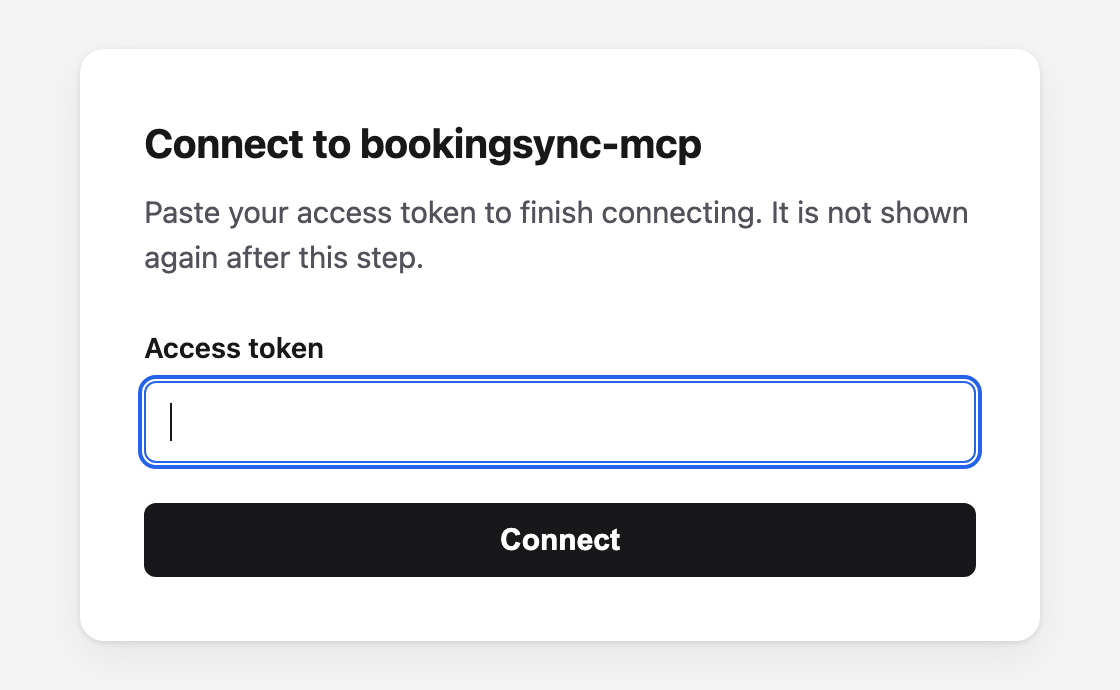
Click Connect. A Smily page opens in your browser:
-
Paste your MCP token (
mcp_…) into Access token and click Connect. You are returned to Claude and the connector shows as connected. -
In a conversation, enable the connector from the + → Connectors menu.
Connect to bookingsync-mcp is Smily's own page, served from www.bookingsync.com. It is how a
URL-only connector receives a token, and it asks for the mcp_… token issued to you — not your
Smily account password, and not an OAuth client ID or secret. The token is checked as you submit it,
so a wrong or expired one is rejected right there. Because the connector holds only that token, you
will be sent back through the same page whenever it expires or is revoked — paste the new one there.
See Authentication → Connector sign-in.
Earlier versions of this guide told you to register
https://www.bookingsync.com/mcp?token=mcp_YOUR_TOKEN. That still works, but it is no longer the
recommended way to connect Claude: it turns the whole connector URL into a credential. Register the
bare URL and use the sign-in page instead. See
Authentication → Token in the URL.
Custom connectors connect from Anthropic's infrastructure over the public internet —
www.bookingsync.com is publicly reachable, so no firewall changes are needed.
OpenAI Codex
Codex CLI stores MCP servers in ~/.codex/config.toml (or a project-scoped .codex/config.toml in
trusted projects). It supports streamable HTTP servers directly.
[mcp_servers.smily]
url = "https://www.bookingsync.com/mcp"
bearer_token_env_var = "SMILY_MCP_TOKEN"
bearer_token_env_var names an environment variable whose value Codex sends as the
Authorization: Bearer token, so the secret stays out of the config file:
export SMILY_MCP_TOKEN="mcp_YOUR_TOKEN"
If your Codex version supports arbitrary headers, you can instead use:
[mcp_servers.smily]
url = "https://www.bookingsync.com/mcp"
http_headers = { Authorization = "Bearer mcp_YOUR_TOKEN" }
Other clients (mcp-remote bridge)
For an MCP client that only speaks stdio (e.g. older Claude Desktop configurations, or clients
without native HTTP transport), bridge to the HTTP endpoint with the
mcp-remote adapter:
{
  "mcpServers": {
    "smily": {
      "command": "npx",
      "args": [
        "-y", "mcp-remote",
        "https://www.bookingsync.com/mcp",
        "--header", "Authorization: Bearer mcp_YOUR_TOKEN"
      ]
    }
  }
}
This works with any client that accepts a command/args stdio server definition.
Verifying with raw HTTP
You don't need a client to test the server — curl works. See
Protocol & transport for a full initialize →
tools/list → tools/call walkthrough. The quickest smoke test is the unauthenticated health
probe:
curl https://www.bookingsync.com/mcp/health
# => {"status":"ok","server":"bookingsync-mcp","version":"1.0.0","protocol_version":"2025-06-18"}
Troubleshooting
| Symptom | Likely cause | Fix |
|---|---|---|
Unauthorized (-32000) | Missing, invalid, expired, or revoked token. | Check the token; generate a new one if needed. See Authentication. |
Session not found or expired (-32001) | Client didn't echo Mcp-Session-Id, or the 1-hour session expired. | Re-initialize. Most clients do this automatically. See Protocol → Sessions. |
Rate limit exceeded (-32029, HTTP 429) | More than 1,000 requests in an hour. | Wait for Retry-After seconds. See Authentication → Rate limiting. |
| Connecting a Claude connector opens a Connect to bookingsync-mcp page | Expected — that is how a URL-only connector receives the token. | Paste your mcp_… token and click Connect. See Claude Cowork and other custom connectors. |
| A working connector suddenly asks you to connect again | The token behind it expired or was revoked. | Reconnect and paste a fresh token. |
| That access token is not valid, or it has expired or been revoked. on the connect page | Wrong, expired or revoked token — or an API v3 OAuth token pasted instead of an MCP one. | Check the value starts with mcp_; request a new token if needed. See Authentication. |
| Unregistered redirect_uri. (HTTP 400) instead of the connect page | The client's OAuth callback URL is not one Smily accepts. | Contact Smily naming the client — each callback has to be allowed explicitly. |
account_id is required for this token (-32602) | Multi-account token without an account pinned. | Pass account_id (or the X-BookingSync-Account-ID header). See account selection. |
Invalid params (-32602) | Unknown resource, attribute, operator, or field. | Call api_v3_resources / api_v3_resource_schema to get valid values. |